Printable Project Journal
Daily project progress tracker and work journal
Keep your projects on track with daily progress logging, milestone tracking, and blocker identification. Stay accountable and deliver on time with structured project journaling.
Customize fields
Toggle fields on or off. Click the pencil to rename, or add your own fields.
What is this journal?
A project journal keeps every moving piece of your work visible in one place. Whether you are building an app, planning an event, or renovating a room, projects have a way of growing more complex than expected. This journal combines daily progress tracking with structured reflection so you always know where you stand, what is blocking you, and what to tackle next.
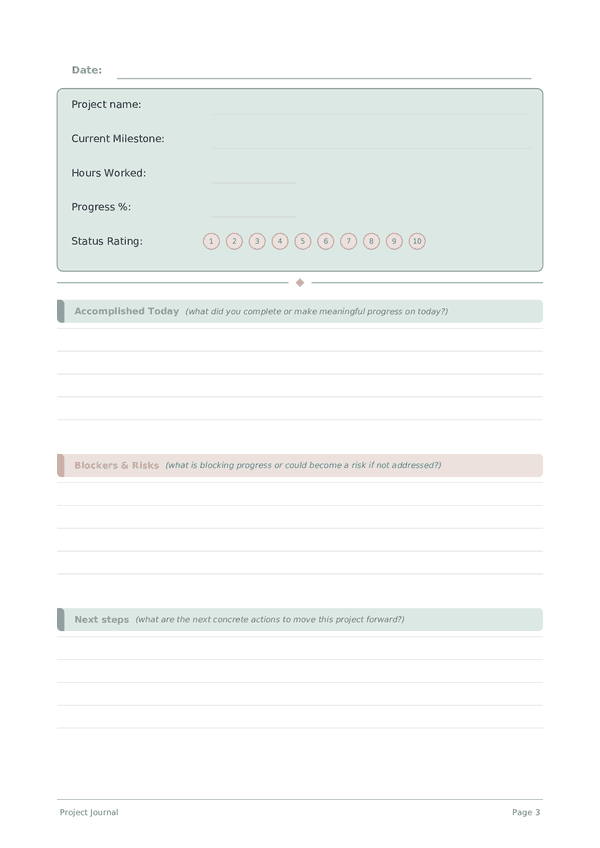
The tracker section logs the project name, current milestone, hours worked, overall percentage complete, and a status rating for the day. The writing section captures what you actually accomplished, any blockers or risks you identified, decisions you need to make, and your planned next steps. Together, these sections create a living project log that is far more honest than a status meeting.
Fill in the tracker at the end of each work session and spend a few minutes on the written reflection. When a project stretches over weeks or months, these entries become your most reliable record of how decisions were made and why — invaluable for retrospectives and future planning.
Filled example
Here's what a typical entry looks like when filled in:
How to fill in each field
The top of each page has quick-fill fields (ratings, checkboxes, numbers). Below that is a lined section for writing. Here's what each field means:
Project name
What project are you working on today?
Current Milestone
What milestone or phase are you currently working toward?
Hours Worked
How many hours did you work on this project today?
Progress %
Overall project completion percentage (0-100)
Status Rating
How healthy is the project right now? (1=critical, 5=on track)
Accomplished Today
What did you complete or make meaningful progress on today?
Blockers & Risks
What is blocking progress or could become a risk if not addressed?
Next steps
What are the next concrete actions to move this project forward?
Decisions Needed
What decisions need to be made to unblock or advance the project?
Tips for success
When and how often to write
Write an entry at the start and end of every work session on the project. The opening entry sets intention and priorities; the closing entry captures progress, decisions, and the next action. For long-running projects, add a weekly summary that rolls up daily entries into a high-level status. Monthly, review the arc of the project: are you closer to the goal, has the goal shifted, and are your estimates improving? This layered rhythm — daily, weekly, monthly — keeps you both productive and strategic.