Printable Project Journal
Daily project progress tracker and work journal
Keep your projects on track with daily progress logging, milestone tracking, and blocker identification. Stay accountable and deliver on time with structured project journaling.
Customize fields
Toggle fields on or off. Click the pencil to rename, or add your own fields.
What is this journal?
A project journal keeps every moving piece of your work visible in one place. Whether you are building an app, planning an event, or renovating a room, projects have a way of growing more complex than expected. This journal combines daily progress tracking with structured reflection so you always know where you stand, what is blocking you, and what to tackle next.
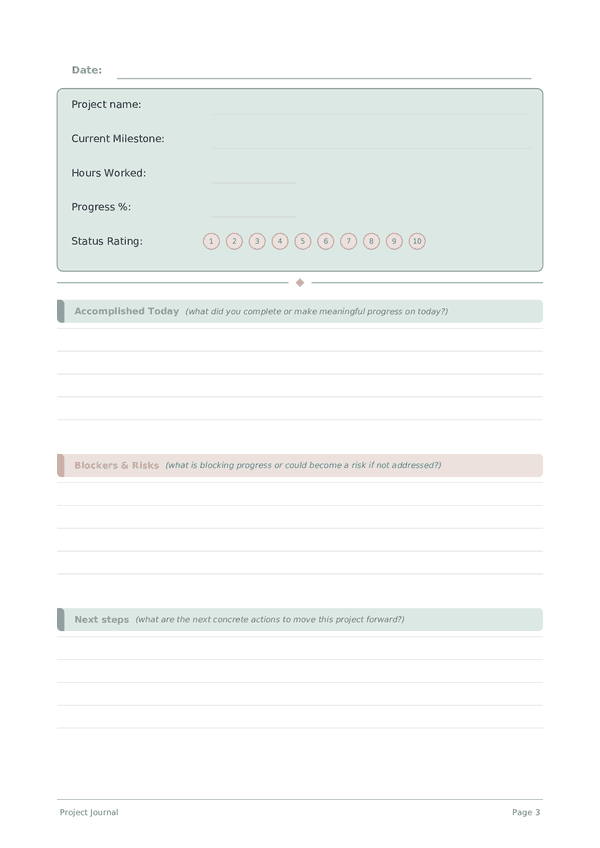
The tracker section logs the project name, current milestone, hours worked, overall percentage complete, and a status rating for the day. The writing section captures what you actually accomplished, any blockers or risks you identified, decisions you need to make, and your planned next steps. Together, these sections create a living project log that is far more honest than a status meeting.
Fill in the tracker at the end of each work session and spend a few minutes on the written reflection. When a project stretches over weeks or months, these entries become your most reliable record of how decisions were made and why — invaluable for retrospectives and future planning.
Filled example
Here's what a typical entry looks like when filled in:
How to fill in each field
The top of each page has quick-fill fields (ratings, checkboxes, numbers). Below that is a lined section for writing. Here's what each field means:
Project name
What project are you working on today?
Current Milestone
What milestone or phase are you currently working toward?
Hours Worked
How many hours did you work on this project today?
Progress %
Overall project completion percentage (0-100)
Status Rating
How healthy is the project right now? (1=critical, 5=on track)
Accomplished Today
What did you complete or make meaningful progress on today?
Blockers & Risks
What is blocking progress or could become a risk if not addressed?
Next steps
What are the next concrete actions to move this project forward?
Decisions Needed
What decisions need to be made to unblock or advance the project?
Tips for success
When and how often to write
Write an entry at the start and end of every work session on the project. The opening entry sets intention and priorities; the closing entry captures progress, decisions, and the next action. For long-running projects, add a weekly summary that rolls up daily entries into a high-level status. Monthly, review the arc of the project: are you closer to the goal, has the goal shifted, and are your estimates improving? This layered rhythm — daily, weekly, monthly — keeps you both productive and strategic.
Frequently Asked Questions
What does the Project Journal track each day?
Five tracker fields — project name, current milestone, hours worked, progress % (0-100), and status rating (0-10) — plus five lined rows for accomplished today, blockers & risks, next steps, and decisions needed. The structure forces daily accountability and surfaces blockers before they cascade. It works for any kind of project: software, research, writing, craft, business launches.
Why log hours worked when I could just track tasks done?
Hours measure investment; tasks measure output. Tracking both reveals efficiency patterns — a milestone that took 40 expected hours but consumed 80 is a re-estimation signal, not a personal failure. Project research consistently shows individuals underestimate task duration by 25-50% (the planning fallacy). Hours worked alongside progress % over weeks calibrates your estimates honestly.
How do I use progress % realistically?
Estimate against the milestone's total scope, not against your feeling of effort. The classic project trap is the '90% done for the last 30% of the time' pattern. Be conservative — call it 60% rather than 75% when uncertain. Comparing yesterday's estimate against today's reality is a feedback loop that improves accuracy faster than any planning method, and it takes 30 seconds.
What goes in the blockers and risks section?
Concrete obstacles (waiting on input, missing tool, unresolved decision) plus risks not yet blocking but likely to (looming deadline, dependency uncertainty). Writing down a blocker turns it from anxious background noise into an actionable item — often a quick message, decision, or escalation. Unsurfaced blockers cause far more project delay than the work itself.
How is decisions needed different from next steps?
Next steps are actions you can take alone tomorrow. Decisions needed are choices that require input — from yourself after sleep, from a collaborator, from a client. Separating them prevents the common trap of starting work that should have waited for a decision. Most stalled projects fail at decision points, not execution points. The two-line field makes you name those gates explicitly.
How does daily journaling change project outcomes?
Daily progress logging builds what Amabile (2011, The Progress Principle, Harvard Business Review Press) identifies as the strongest predictor of creative work satisfaction and persistence: a visible sense of meaningful progress. The accomplished today field — even with small entries — sustains motivation through long projects. Reviewing the running record on hard days reframes 'nothing's working' into the actual record of progress.
How often should I review past project entries?
Daily skim of yesterday's entry at session start; weekly review of the full week. The weekly view exposes patterns: recurring blockers, optimistic estimates, the kinds of work that take longer than planned. This is also when status rating dips become visible — a string of low ratings signals burnout or scope problems before they become crises.
Can I track multiple projects in one journal?
Yes — the project name field is per-entry. Either dedicate sequential pages to different projects or batch them by day. Single-project users gain a tighter narrative; multi-project users gain cross-project pattern visibility. For more than three active projects, a separate journal per major project is usually clearer than one mixed log. Adapt to whatever produces honest daily entries.
You Might Also Like

Scroll to zoom, drag to move