Printable Project Journal
Daily project progress tracker and work journal
Keep your projects on track with daily progress logging, milestone tracking, and blocker identification. Stay accountable and deliver on time with structured project journaling.
Personalizar campos
Activa o desactiva campos. Haz clic en el lápiz para renombrar, o añade tus propios campos.
¿Qué es este diario?
A project journal keeps every moving piece of your work visible in one place. Whether you are building an app, planning an event, or renovating a room, projects have a way of growing more complex than expected. This journal combines daily progress tracking with structured reflection so you always know where you stand, what is blocking you, and what to tackle next.
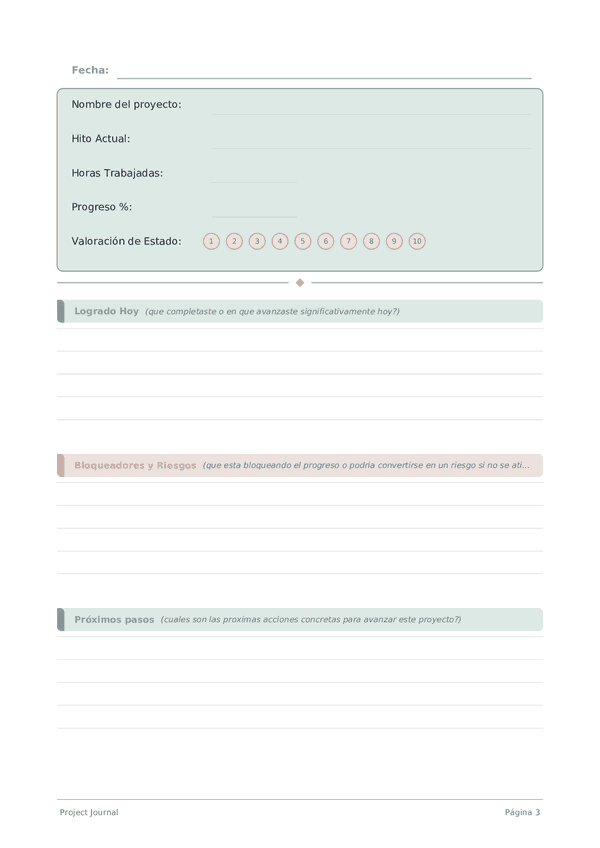
The tracker section logs the project name, current milestone, hours worked, overall percentage complete, and a status rating for the day. The writing section captures what you actually accomplished, any blockers or risks you identified, decisions you need to make, and your planned next steps. Together, these sections create a living project log that is far more honest than a status meeting.
Fill in the tracker at the end of each work session and spend a few minutes on the written reflection. When a project stretches over weeks or months, these entries become your most reliable record of how decisions were made and why — invaluable for retrospectives and future planning.
Ejemplo completado
Así es como se ve una entrada típica cuando se rellena:
Cómo rellenar cada campo
La parte superior de cada pagina tiene campos de llenado rapido (calificaciones, casillas, numeros). Debajo hay una seccion con lineas para escribir. Esto es lo que significa cada campo:
Nombre del proyecto
En que proyecto estas trabajando hoy?
Hito Actual
Hacia que hito o fase estas trabajando actualmente?
Horas Trabajadas
Cuantas horas trabajaste en este proyecto hoy?
Progreso %
Porcentaje general de avance del proyecto (0-100)
Valoración de Estado
Que tan saludable esta el proyecto ahora? (1=critico, 5=en camino)
Logrado Hoy
Que completaste o en que avanzaste significativamente hoy?
Bloqueadores y Riesgos
Que esta bloqueando el progreso o podria convertirse en un riesgo si no se atiende?
Próximos pasos
Cuales son las proximas acciones concretas para avanzar este proyecto?
Decisiones Necesarias
Que decisiones deben tomarse para desbloquear o avanzar el proyecto?
Consejos para el exito
Cuando y con que frecuencia escribir
Write an entry at the start and end of every work session on the project. The opening entry sets intention and priorities; the closing entry captures progress, decisions, and the next action. For long-running projects, add a weekly summary that rolls up daily entries into a high-level status. Monthly, review the arc of the project: are you closer to the goal, has the goal shifted, and are your estimates improving? This layered rhythm — daily, weekly, monthly — keeps you both productive and strategic.
Preguntas frecuentes
¿Qué registra el Diario de Proyectos cada día?
Cinco campos del rastreador — nombre del proyecto, hito actual, horas trabajadas, porcentaje de progreso (0-100) y valoración de estado (0-10) — más cinco líneas para logros de hoy, bloqueos y riesgos, próximos pasos y decisiones necesarias. La estructura fuerza la responsabilidad diaria y detecta los bloqueos antes de que se propaguen. Admite cualquier tipo de proyecto: software, investigación, escritura, artesanía, lanzamientos de negocios.
¿Por qué registrar horas trabajadas cuando podría rastrear solo las tareas completadas?
Las horas miden la inversión; las tareas miden el resultado. Rastrear ambas revela patrones de eficiencia — un hito que tomó 80 horas cuando se esperaban 40 es una señal de reestimación, no un fracaso personal. La investigación de proyectos muestra consistentemente que las personas subestiman la duración de las tareas en un 25-50% (la falacia de planificación). Las horas trabajadas junto al porcentaje de progreso a lo largo de semanas calibra honestamente sus estimaciones.
¿Cómo uso el porcentaje de progreso de manera realista?
Estime contra el alcance total del hito, no contra su sensación de esfuerzo. La trampa clásica de los proyectos es el patrón «90% hecho durante el último 30% del tiempo». Sea conservador — diga 60% en lugar de 75% cuando no esté seguro. Comparar la estimación de ayer con la realidad de hoy es un ciclo de retroalimentación que mejora la precisión más rápido que cualquier método de planificación, y toma 30 segundos.
¿Qué va en la sección de bloqueos y riesgos?
Obstáculos concretos (esperando una entrada, herramienta faltante, decisión no resuelta) más riesgos que aún no bloquean pero probablemente lo harán (plazo inminente, dependencia incierta). Nombrar un bloqueo por escrito lo convierte de ruido de fondo ansioso en un elemento accionable — a menudo un mensaje rápido, una decisión o una escalada. Los bloqueos no detectados causan más retraso en el proyecto que el trabajo en sí.
¿En qué se diferencian las decisiones necesarias de los próximos pasos?
Los próximos pasos son acciones que puede tomar solo mañana. Las decisiones necesarias son elecciones que requieren aportación — de usted mismo después de dormir, de un colaborador, de un cliente. Separarlas evita la trampa común de empezar trabajo que debería haber esperado una decisión. La mayoría de los proyectos estancados fallan en los puntos de decisión, no en los de ejecución. El campo de dos líneas le obliga a nombrar esos puntos de control explícitamente.
¿Cómo cambia el diario diario los resultados del proyecto?
El registro diario de progreso construye lo que Amabile (2011, The Progress Principle, Harvard Business Review Press) identifica como el predictor más fuerte de la satisfacción y la persistencia en el trabajo creativo: un sentido visible de progreso significativo. El campo de logros de hoy — incluso con entradas pequeñas — sostiene la motivación a través de proyectos largos. Revisar el registro corriente en los días difíciles reencuadra «nada está funcionando» en el registro real de progreso.
¿Con qué frecuencia revisar las entradas de proyectos pasadas?
Revisión rápida diaria de la entrada de ayer al inicio de la sesión; revisión semanal de la semana completa. La vista semanal expone patrones: bloqueos recurrentes, estimaciones optimistas, los tipos de trabajo que tardan más de lo planeado. También es cuando las caídas de la valoración de estado se vuelven visibles — una serie de valoraciones bajas señala el agotamiento o los problemas de alcance antes de que se conviertan en crisis.
¿Puedo rastrear varios proyectos en un diario?
Sí — el campo de nombre del proyecto es por entrada. Puede dedicar páginas secuenciales a diferentes proyectos o agruparlos por día. Los usuarios de un solo proyecto obtienen una narrativa más ajustada; los de múltiples proyectos obtienen visibilidad de patrones entre proyectos. Para más de tres proyectos activos, un diario separado por proyecto principal suele ser más claro que un registro mixto.
También Te Puede Gustar

Rueda para ampliar, arrastra para mover