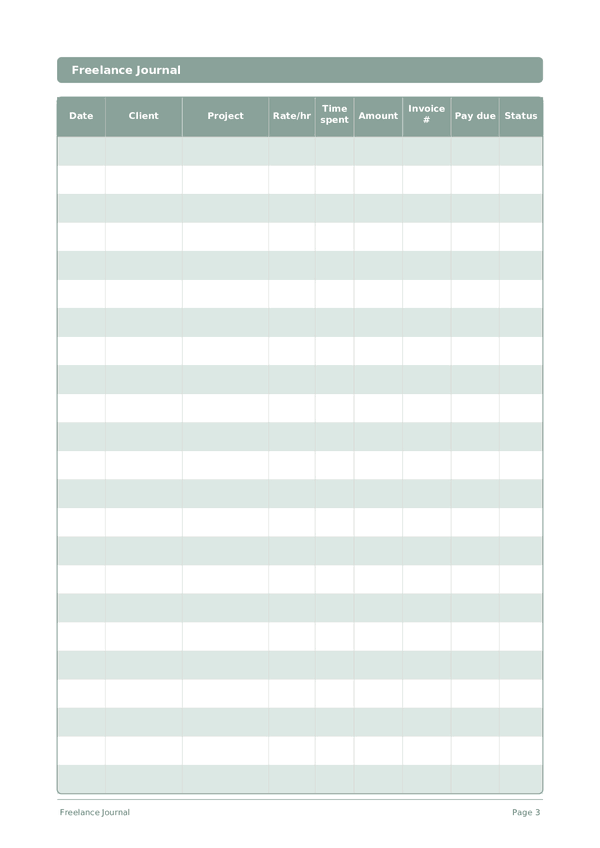
Printable Freelance Journal
Track clients, projects, hours, and invoices in one place
The Freelance Journal is a structured work log for independent professionals. Record every client engagement, project, hours worked, invoiced amount, and payment status in one organized table. Whether you are a designer, developer, writer, or consultant, this journal helps you stay on top of your workload and cash flow without complex software.
Customize fields
Toggle fields on or off. Click the pencil to rename, or add your own fields.
Benefits
How to Use
What is this journal?
A Freelance Journal is your financial command center for independent work. Each row logs the date, client, project, hourly rate, time spent, amount earned, invoice number, payment due date, and status. By keeping everything in one structured log, you always know exactly where your income stands — who owes you money, which projects are most profitable, and where your time actually goes.
Freelancing without organized records is a recipe for missed invoices, underpriced work, and tax-season panic. This journal solves all three problems. When you can see at a glance that Client A pays more per hour than Client B but takes twice as long to pay, you make better business decisions. When tax time arrives, your records are already in order.
Log every work session as it happens — even fifteen-minute blocks add up. Update the status column as invoices move from Draft to Sent to Paid. At the end of each month, review the log to calculate your effective hourly rate per client and identify which types of projects deserve more of your time.
Filled example
Here's what a typical entry looks like when filled in:
| Date | Client | Project | Rate/hr | Time spent | Amount | Invoice # | Pay due | Status |
|---|---|---|---|---|---|---|---|---|
| 2025-01-06 | Riverside Marketing | Brand refresh | 85 | 4.5 | 382.5 | INV-2025-012 | 2025-02-05 | Sent |
| 2025-01-07 | TechStart LLC | Landing page design | 95 | 6 | 570 | INV-2025-013 | 2025-02-06 | Draft |
| 2025-01-07 | Riverside Marketing | Brand refresh | 85 | 3 | 255 | INV-2025-012 | 2025-02-05 | Sent |
| 2025-01-08 | Bloom & Co | Social media templates | 75 | 5 | 375 | INV-2025-014 | 2025-02-07 | Paid |
| 2025-01-08 | TechStart LLC | Landing page design | 95 | 2.5 | 237.5 | INV-2025-013 | 2025-02-06 | Draft |
How to fill in each field
Each page is a table with columns. Fill in one row per entry. Here's what each column is for:
Date
Write today's date. This anchors your entry in time and helps when reviewing entries later.
Client
Client name or company
Project
Project name or task description
Rate/hr
Your hourly rate for this project in dollars
Time spent
How long did you study?
Amount
Record the amount for this entry. Be precise — rounding creates inaccuracies that add up over time.
Invoice #
Invoice reference number (e.g. INV-001)
Pay due
When payment is due from the client
Status
Applied, Phone screen, Interview, Offer, Rejected, Withdrawn...
Tips for success
When and how often to write
Update your freelance log at the end of every working day — record hours, tasks completed, and any invoices sent or payments received. This takes 5 minutes and prevents the end-of-month scramble to reconstruct your hours. Weekly, review your pipeline: upcoming deadlines, pending invoices, and capacity for new work. Monthly, calculate your effective hourly rate (total income divided by total hours including non-billable), review client profitability, and plan your acquisition efforts for the next month.
Frequently Asked Questions
Why log every session in a row instead of just invoiced totals?
Per-session entries reveal effective hourly rate, which differs from quoted rate/hr. The U.S. Bureau of Labor Statistics (2023, American Time Use Survey) documents how self-employed work often includes uncompensated hours. Recording time spent against amount on each row exposes scope creep before it consumes a project, and gives you defensible records if a client questions an invoice.
How do I use the invoice # and pay due columns for cash flow?
Number invoices sequentially (INV-001) for IRS substantiation and set pay due based on agreed terms — Net-15, Net-30. The IRS (Publication 334, 'Tax Guide for Small Business') requires self-employed taxpayers to maintain organized income records. The two columns together let you scan the page weekly and identify any row whose status is unpaid past its due date.
What status values keep the journal useful at tax time?
Use a small set: Draft, Invoiced, Paid, Overdue, Pending, Cancelled. The IRS (Publication 334, 'Tax Guide for Small Business') requires self-employed records sufficient to determine income and expenses. Consistent status values let you total Paid rows annually for Schedule C income and identify Overdue rows that may need write-off or collection action at year end.
How does this journal compare to QuickBooks or FreshBooks?
Software handles automation; this journal handles awareness. The IRS (Publication 583, 'Starting a Business and Keeping Records') accepts any record system that completely captures income and expenses. Many freelancers run both — software for invoices and tax filing, journal for the reflective discipline of seeing rate/hr, time spent, and status on every row, which catches scope creep automation hides.
Should I include unbilled or pro-bono work?
Yes, with rate/hr marked zero or with a note. The IRS (Publication 334, 'Tax Guide for Small Business') does not require recording uncompensated work for income tax, but tracking it reveals true client cost. Many freelancers underestimate revisions, calls, and admin — logging time spent on these rows produces honest data for repricing or declining future similar work.
How do I track multiple projects per client?
Use a separate row per project rather than per client. The nine columns — date, client, project, rate/hr, time spent, amount, invoice #, pay due, status — accommodate distinct project lines under one client name. The IRS (Publication 583, 'Starting a Business and Keeping Records') requires records detailed enough to substantiate each income item separately, which row-per-project supports.
What is the most common freelance accounting mistake?
Conflating invoiced amount with collected amount. The IRS (Publication 334, 'Tax Guide for Small Business') notes cash-basis taxpayers report income when received, not when billed. Maintaining the status column religiously — moving rows from Invoiced to Paid only when funds clear — keeps tax numbers honest and surfaces Overdue rows that need follow-up before they become bad debt.
How often should I review the journal?
Weekly to catch overdue rows, monthly for cash-flow and client mix, quarterly for tax. The IRS (Publication 505, 'Tax Withholding and Estimated Tax') requires self-employed taxpayers to pay estimated taxes quarterly, making quarterly totals practical not optional. With 15 rows per page, a typical solo freelancer needs one or two pages monthly — small enough to review without procrastination.
You Might Also Like
Scroll to zoom, drag to move