Printable Freelance Journal
Track clients, projects, hours, and invoices in one place
The Freelance Journal is a structured work log for independent professionals. Record every client engagement, project, hours worked, invoiced amount, and payment status in one organized table. Whether you are a designer, developer, writer, or consultant, this journal helps you stay on top of your workload and cash flow without complex software.
Personalizar campos
Activa o desactiva campos. Haz clic en el lápiz para renombrar, o añade tus propios campos.
Beneficios
Cómo Usar
¿Qué es este diario?
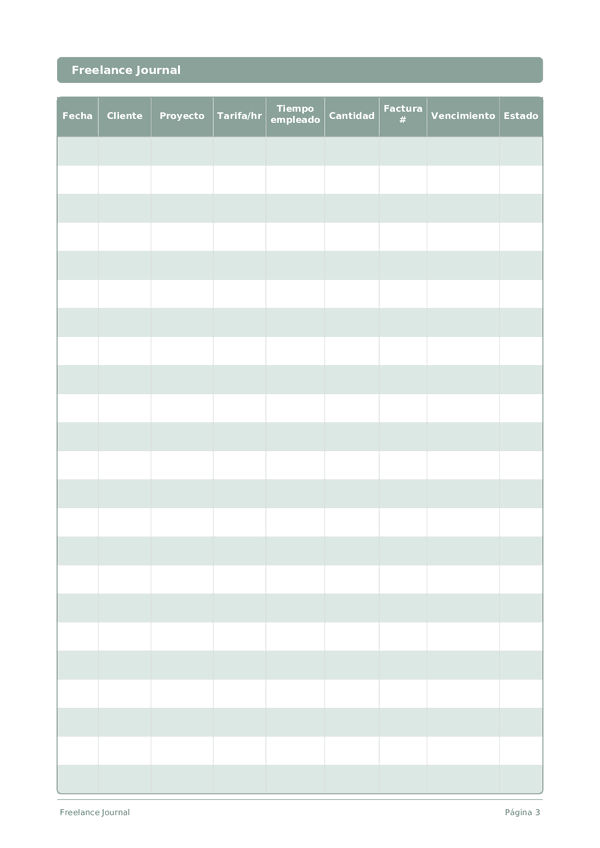
A Freelance Journal is your financial command center for independent work. Each row logs the date, client, project, hourly rate, time spent, amount earned, invoice number, payment due date, and status. By keeping everything in one structured log, you always know exactly where your income stands — who owes you money, which projects are most profitable, and where your time actually goes.
Freelancing without organized records is a recipe for missed invoices, underpriced work, and tax-season panic. This journal solves all three problems. When you can see at a glance that Client A pays more per hour than Client B but takes twice as long to pay, you make better business decisions. When tax time arrives, your records are already in order.
Log every work session as it happens — even fifteen-minute blocks add up. Update the status column as invoices move from Draft to Sent to Paid. At the end of each month, review the log to calculate your effective hourly rate per client and identify which types of projects deserve more of your time.
Ejemplo completado
Así es como se ve una entrada típica cuando se rellena:
| Fecha | Cliente | Proyecto | Tarifa/hr | Tiempo empleado | Cantidad | Factura # | Vencimiento | Estado |
|---|---|---|---|---|---|---|---|---|
| 2025-01-06 | Riverside Marketing | Brand refresh | 85 | 4.5 | 382.5 | INV-2025-012 | 2025-02-05 | Sent |
| 2025-01-07 | TechStart LLC | Landing page design | 95 | 6 | 570 | INV-2025-013 | 2025-02-06 | Draft |
| 2025-01-07 | Riverside Marketing | Brand refresh | 85 | 3 | 255 | INV-2025-012 | 2025-02-05 | Sent |
| 2025-01-08 | Bloom & Co | Social media templates | 75 | 5 | 375 | INV-2025-014 | 2025-02-07 | Paid |
| 2025-01-08 | TechStart LLC | Landing page design | 95 | 2.5 | 237.5 | INV-2025-013 | 2025-02-06 | Draft |
Cómo rellenar cada campo
Cada pagina es una tabla con columnas. Completa una fila por entrada. Esto es lo que significa cada columna:
Fecha
Escribe la fecha de hoy. Esto ancla tu entrada en el tiempo y ayuda cuando revisas entradas despues.
Cliente
Nombre del cliente o empresa
Proyecto
Nombre del proyecto o descripcion de la tarea
Tarifa/hr
Tu tarifa por hora para este proyecto en dolares
Tiempo empleado
Cuanto tiempo estudiaste?
Cantidad
Registra el monto de esta entrada. Se preciso: el redondeo crea inexactitudes que se acumulan con el tiempo.
Factura #
Numero de referencia de factura (ej. FAC-001)
Vencimiento
Cuando vence el pago del cliente
Estado
Aplicado, Llamada inicial, Entrevista, Oferta, Rechazado, Retirado...
Consejos para el exito
Cuando y con que frecuencia escribir
Update your freelance log at the end of every working day — record hours, tasks completed, and any invoices sent or payments received. This takes 5 minutes and prevents the end-of-month scramble to reconstruct your hours. Weekly, review your pipeline: upcoming deadlines, pending invoices, and capacity for new work. Monthly, calculate your effective hourly rate (total income divided by total hours including non-billable), review client profitability, and plan your acquisition efforts for the next month.
Preguntas frecuentes
¿Por qué registrar cada sesión en una fila en lugar de solo los totales facturados?
Las entradas por sesión revelan la tarifa horaria efectiva, que difiere de la tarifa/hr cotizada. El U.S. Bureau of Labor Statistics (2023, American Time Use Survey) documenta que el trabajo autónomo suele incluir horas no remuneradas. Registrar tiempo empleado frente a amount en cada fila expone el aumento de alcance antes de que consuma el proyecto y proporciona registros defendibles si un cliente cuestiona una factura.
¿Cómo uso las columnas factura # y vencimiento para el flujo de caja?
Numere las facturas de forma secuencial (FAC-001) para la justificación fiscal y establezca vencimiento según los términos acordados: 15 o 30 días. La Agencia Tributaria (AEAT) y la IRS (Publication 334, 'Tax Guide for Small Business') exigen registros organizados de ingresos para los autónomos. Las dos columnas juntas permiten revisar la página semanalmente e identificar filas sin pago vencidas.
¿Qué valores de status mantienen el diario útil en la declaración de impuestos?
Use un conjunto reducido: Borrador, Facturado, Cobrado, Vencido, Pendiente, Cancelado. La IRS (Publication 334, 'Tax Guide for Small Business') y la AEAT exigen registros suficientes para determinar ingresos y gastos. Los valores de status consistentes le permiten sumar anualmente las filas 'Cobrado' para los ingresos del año e identificar las filas 'Vencido' que podrían requerir acción de cobro o baja contable al cierre del ejercicio.
¿En qué se diferencia este diario de QuickBooks o Holded?
El software gestiona la automatización; este diario gestiona la conciencia. La IRS (Publication 583, 'Starting a Business and Keeping Records') acepta cualquier sistema de registro que capture ingresos y gastos completos. Muchos freelancers usan ambos: el software para facturas e informes fiscales, y el diario para la disciplina reflexiva de ver tarifa/hr, tiempo empleado y status en cada fila, lo que detecta el aumento de alcance que la automatización oculta.
¿Debo incluir el trabajo gratuito o pro bono?
Sí, con tarifa/hr marcada en cero o con una nota. La IRS (Publication 334) no exige registrar trabajo no remunerado para impuestos, pero hacerlo revela el coste real del cliente. Muchos autónomos subestiman revisiones, llamadas y tareas administrativas. Registrar tiempo empleado en esas filas produce datos honestos para revisar precios o rechazar trabajos similares en el futuro.
¿Cómo hago el seguimiento de varios proyectos de un mismo cliente?
Use una fila por proyecto, no por cliente. Las nueve columnas —date, client, project, tarifa/hr, tiempo empleado, amount, factura #, vencimiento, status— admiten líneas de proyecto distintas bajo el mismo nombre de cliente. La IRS (Publication 583, 'Starting a Business and Keeping Records') exige registros suficientemente detallados para justificar cada partida de ingreso por separado, algo que el enfoque fila-por-proyecto cumple.
¿Cuál es el error contable más habitual en el freelance?
Confundir el importe facturado con el cobrado. La IRS (Publication 334) señala que los contribuyentes en base de caja deben contabilizar los ingresos cuando los reciben, no cuando los facturan. Mantener la columna status con rigor —mover filas de 'Facturado' a 'Cobrado' solo cuando el dinero llega— mantiene los datos fiscales honestos y detecta filas vencidas antes de que se conviertan en deudas incobrables.
¿Con qué frecuencia debo revisar el diario?
Semanalmente para detectar filas vencidas; mensualmente para el flujo de caja y la mezcla de clientes; trimestralmente para los impuestos. La IRS (Publication 505, 'Tax Withholding and Estimated Tax') exige a los autónomos pagar impuestos trimestralmente en EE. UU.; en España, los autónomos presentan el IVA e IRPF trimestralmente ante la AEAT. Con 15 filas por página, un autónomo en solitario utiliza una o dos páginas al mes.
También Te Puede Gustar
Rueda para ampliar, arrastra para mover