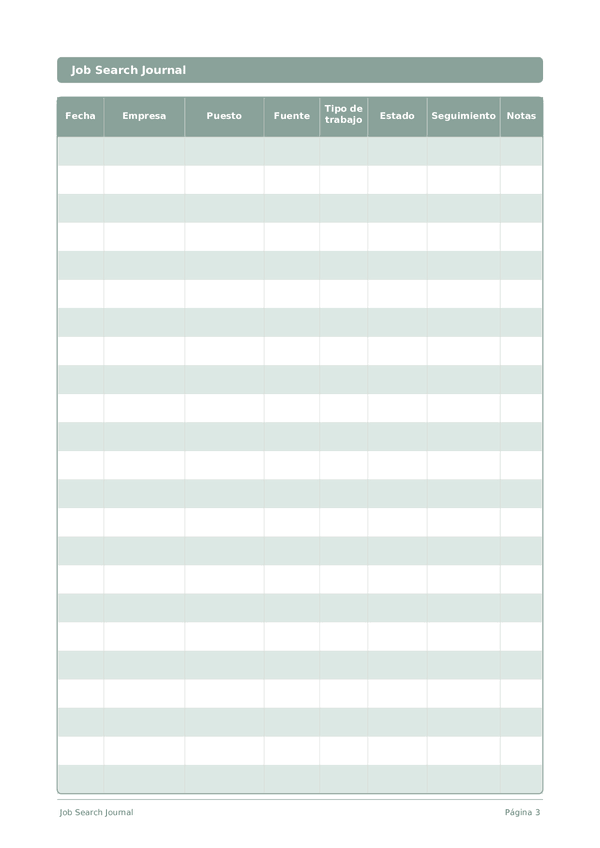
Printable Job Search Journal
Track every application, interview, and follow-up in one organized log
Job searching is a numbers game — and staying organized is the competitive advantage most candidates overlook. This structured table-log journal gives you a clear view of every application at a glance: where you applied, the role, source, current status, and when to follow up. Stop juggling browser tabs and sticky notes. One row per application, complete visibility over your entire search.
Personalizar campos
Activa o desactiva campos. Haz clic en el lápiz para renombrar, o añade tus propios campos.
Beneficios
Cómo Usar
¿Qué es este diario?
A Job Search Journal is a structured log that keeps every application, contact, and follow-up organized in one place. Each row captures the date, company name, position, source, work type, application status, follow-up date, and notes. Instead of relying on memory or scattered spreadsheets, you get a single, scannable record of your entire job hunt.
Job searching is essentially a project management challenge. The most successful candidates treat it that way — tracking dozens of applications, remembering which recruiter said what, and following up at the right time. This journal gives you that system in a clean, printable format that you can review at a glance every morning.
Fill in a new row each time you apply or make a meaningful contact. Update the status column as you progress through stages — Applied, Phone Screen, Interview, Offer, Rejected. Use the notes column for details you will want to recall later, such as the interviewer's name or a specific question they asked. Review your log weekly to identify which strategies are generating the most callbacks.
Ejemplo completado
Así es como se ve una entrada típica cuando se rellena:
| Fecha | Empresa | Puesto | Fuente | Tipo de trabajo | Estado | Seguimiento | Notas |
|---|---|---|---|---|---|---|---|
| 2025-01-06 | Acme Corp | Product Manager | Remote | Interview | 2025-01-13 | 2nd round with VP of Product on Jan 10 | |
| 2025-01-07 | BrightPath Inc | Senior PM | Referral | Hybrid | Applied | 2025-01-14 | Referred by Sarah K., sent portfolio link |
| 2025-01-07 | NovaLabs | Product Lead | Company site | On-site | Phone Screen | 2025-01-10 | HR call scheduled for Jan 9 at 2 PM |
| 2025-01-08 | Greenfield Tech | Associate PM | Indeed | Remote | Applied | 2025-01-15 | Tailored resume to SaaS focus |
| 2025-01-08 | Summit Digital | Product Manager | Recruiter | Hybrid | Rejected | Position filled internally |
Cómo rellenar cada campo
Cada pagina es una tabla con columnas. Completa una fila por entrada. Esto es lo que significa cada columna:
Fecha
Escribe la fecha de hoy. Esto ancla tu entrada en el tiempo y ayuda cuando revisas entradas despues.
Empresa
Nombre de la empresa u organizacion
Puesto
Puesto de trabajo al que aplicaste
Fuente
Libro, curso, video, articulo, persona...
Tipo de trabajo
Remoto, hibrido, presencial, medio tiempo, por contrato...
Estado
Aplicado, Llamada inicial, Entrevista, Oferta, Rechazado, Retirado...
Seguimiento
Cuando enviar un correo de seguimiento
Notas
Agrega cualquier contexto o pensamiento adicional. Esta columna general es para cualquier cosa que no encaje en otro lugar pero pueda ser util despues.
Consejos para el exito
Cuando y con que frecuencia escribir
Update your job search log daily during active searches — add new applications, update statuses, and check follow-up dates. Even on days you do not apply, spend 5 minutes reviewing your pipeline and moving stale applications to no response. Weekly, calculate your application-to-interview ratio to see if your resume and targeting strategy are working. If you are sending 20+ applications with zero callbacks, it is time to revise your approach rather than increase volume.
Preguntas frecuentes
¿Qué valores de estado debo usar en la columna status?
Estandarice un vocabulario corto: Enviada, Criba telefónica, Entrevista, Oferta, Rechazada, Retirada, Sin respuesta. El U.S. Bureau of Labor Statistics (2023, Occupational Outlook Handbook) describe las etapas de reclutamiento típicas en la mayoría de las empresas. La consistencia le permite ordenar y contar resultados por fuente a lo largo del tiempo. Con 15 filas por página, un vistazo a la columna status muestra la forma de su pipeline de candidaturas.
¿Cómo uso la columna source para mejorar mi búsqueda de empleo?
Registre exactamente el origen de cada candidatura: referencia de contacto, LinkedIn, InfoJobs, web de la empresa, headhunter. Después de 20-30 candidaturas, cuente las entrevistas por fuente. El U.S. Bureau of Labor Statistics (2023, Occupational Outlook Handbook) muestra consistentemente que las referencias producen tasas de contratación más altas que las candidaturas frías. Los datos de su columna source le indican dónde invertir la próxima hora de búsqueda.
¿Cuándo establecer seguimiento tras enviar una candidatura?
Cinco a siete días hábiles después de enviarla es un plazo razonable si no tiene otra señal. El U.S. Department of Labor (CareerOneStop.org, 'Follow Up After Applying') recomienda un único recordatorio educado si no ha recibido respuesta. Establezca seguimiento al registrar la candidatura para que no se quede en 'ya lo haré'; la columna de fecha hace que la revisión semanal sea accionable.
¿En qué se diferencia este diario de una hoja de cálculo o un portal de empleo?
El papel genera compromiso de una manera que una pestaña del navegador no puede. Thaler & Sunstein, 'Nudge' (Yale University Press, 2008) describen la fricción física como una ventaja conductual. Las ocho columnas también imponen los mismos campos en cada entrada: date, company, position, source, tipo de trabajo, status, seguimiento, notes, lo que permite comparar candidaturas entre sí en la revisión semanal.
¿Qué debo escribir en la columna notes?
Nombres de entrevistadores, salario discutido, plazos de pruebas técnicas y cualquier señal específica, positiva o bandera roja. El U.S. Department of Labor (CareerOneStop.org, 'Job Interview Tips') recomienda registrar los detalles de la entrevista inmediatamente después de cada conversación. La columna notes estrecha obliga a ser breve; si necesita más detalle, marque un asterisco y continúe al dorso de la página.
¿Cuántas candidaturas por semana son realistas?
La calidad supera al volumen en la mayoría de los puestos. El U.S. Bureau of Labor Statistics (2023, Occupational Outlook Handbook) muestra que las búsquedas de empleo medianas implican decenas de candidaturas durante semanas. Un ritmo habitual es 5-10 candidaturas bien enfocadas semanalmente con una carta de presentación sustancial. La página de 15 filas cubre unas dos semanas a ese ritmo.
¿Cuándo debo dar por cerrada una candidatura en el seguimiento activo?
Después de cuatro semanas sin respuesta, considere la candidatura cerrada salvo que seguimiento indique otra cosa. El U.S. Department of Labor (CareerOneStop.org, 'Follow Up After Applying') señala que la mayoría de los empleadores responden en tres o cuatro semanas. Marque el status como 'Sin respuesta' y dirija la atención a las conversaciones activas en lugar de perseguir el silencio: su tiempo es el recurso limitante.
¿Por qué importa la columna tipo de trabajo para el análisis?
Las candidaturas en remoto, híbrido y presencial convierten a ritmos distintos y tienen remuneraciones diferentes. El U.S. Bureau of Labor Statistics (2023, American Time Use Survey, datos de teletrabajo) hace un seguimiento de la prevalencia del trabajo remoto por ocupación. Registrar tipo de trabajo le permite comparar las tasas de entrevista por modalidad y evitar esfuerzos en mercados incompatibles, como solicitar puestos presenciales cuando necesita trabajo en remoto.
También Te Puede Gustar
Rueda para ampliar, arrastra para mover